GT Strategies

Three live custom indicators.
Built on strategies that survived the testing.

Every backtest paired with its drawdown. Every setting frozen, then tracked out-of-sample. More are on the way, but only the ones that make it.

We also publish the graveyard: every idea we killed, and why.

Start 5-day trial
FROZEN, OOS TRACKING BACKTEST, HYPOTHETICAL

Momentum Retrace

NQ 5m signals, MNQ micro execution

FROZEN CHAMPION BACKTEST, HYPOTHETICAL

Key Level Continuation

NQ 5m signals, MNQ micro execution

FROZEN CHAMPION BACKTEST, HYPOTHETICAL

Asia Range Reclaim

NQ 5m signals, overnight session

Hypothetical backtest results, not live fills. No member account is shown here.

How you get the indicators

Five steps from checkout to your first alert. Most people are set up within a day.
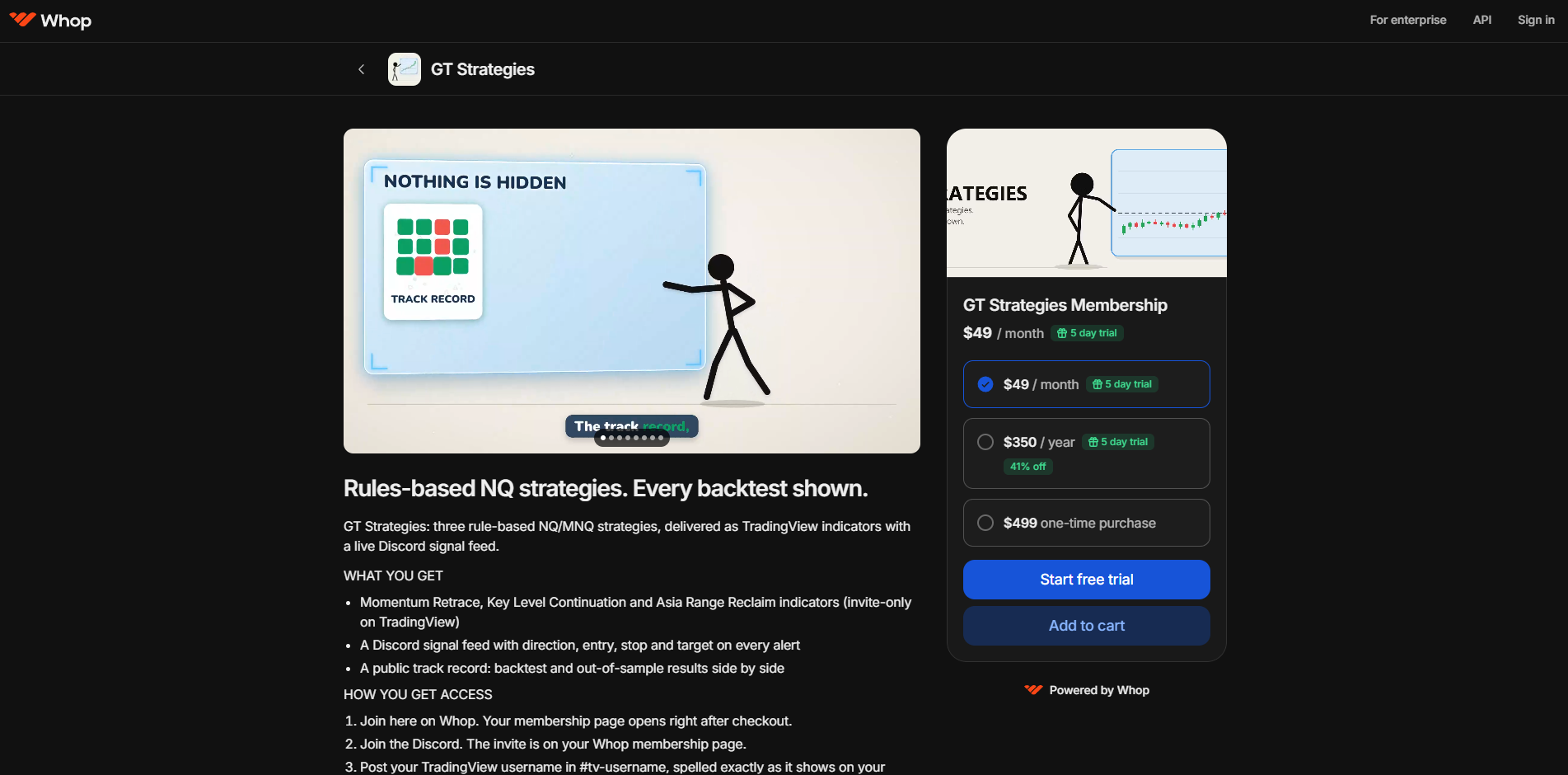
Whop store page with the GT Strategies Membership plans and Start free trial button
01

Join on Whop

Pick a plan and check out. Your membership page opens right after.
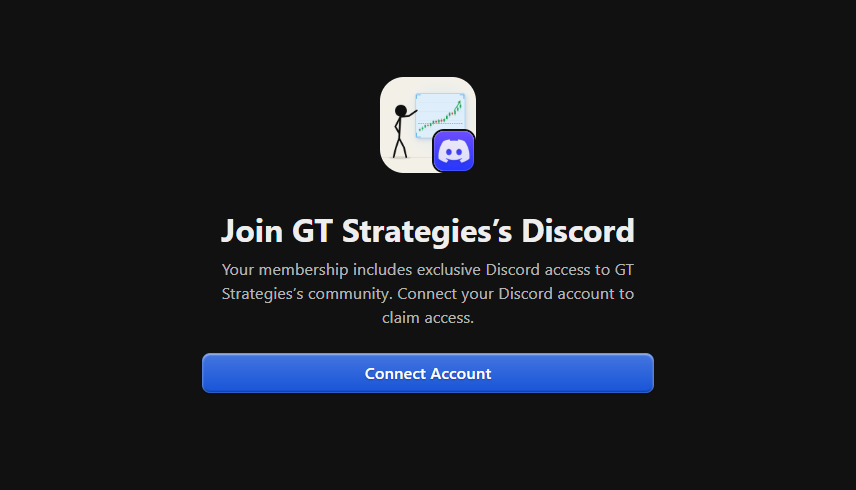
Whop Discord page with the Connect Account button
02

Join the Discord

On Whop, open the Discord tab and click Connect Account. Link your Discord and you are in.
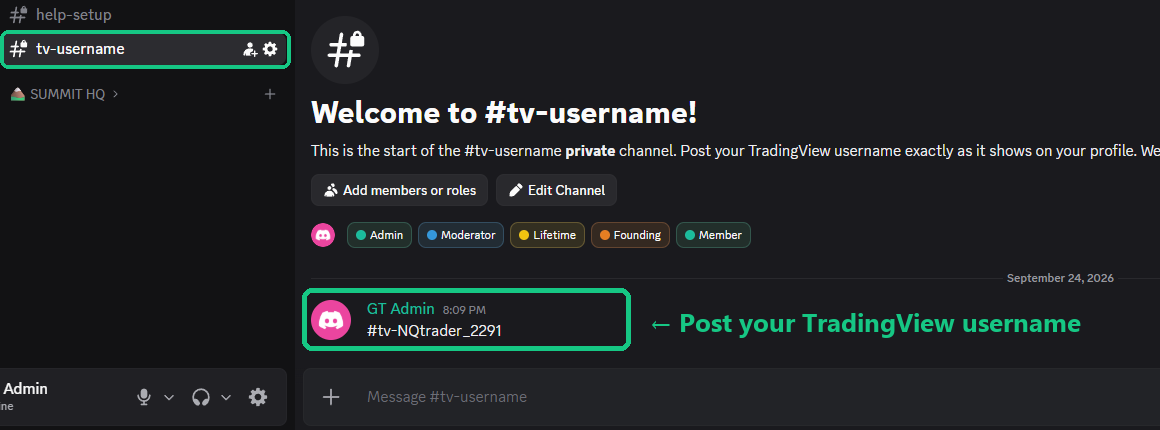
The private tv-username channel in the GT Strategies Discord
03

Post your TradingView username

Post it in #tv-username, spelled exactly as it shows on your TradingView profile.
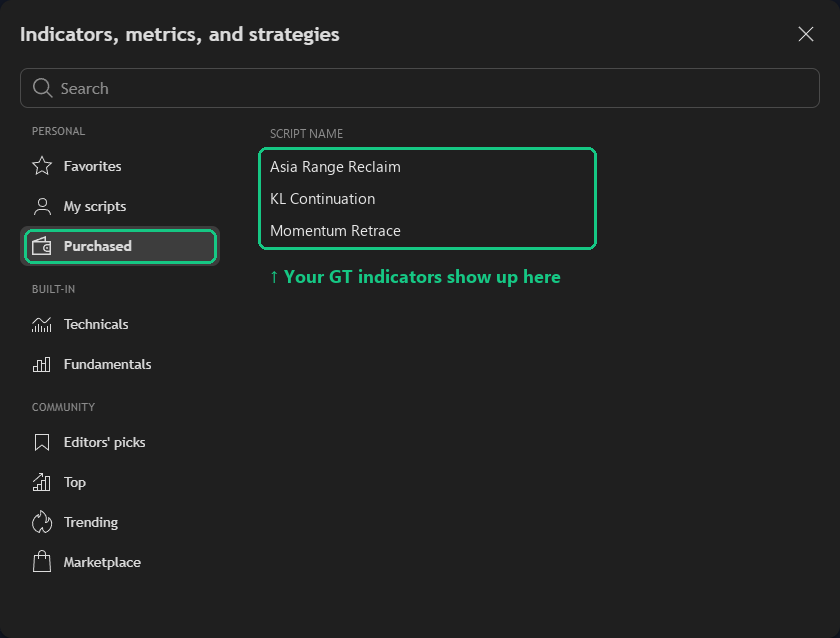
TradingView Indicators panel, Purchased tab, showing the three GT indicators
04

Find the indicators

We add you by hand, usually within 24 hours. In TradingView open Indicators, then Purchased, and add them to an NQ or MNQ 5-minute chart.
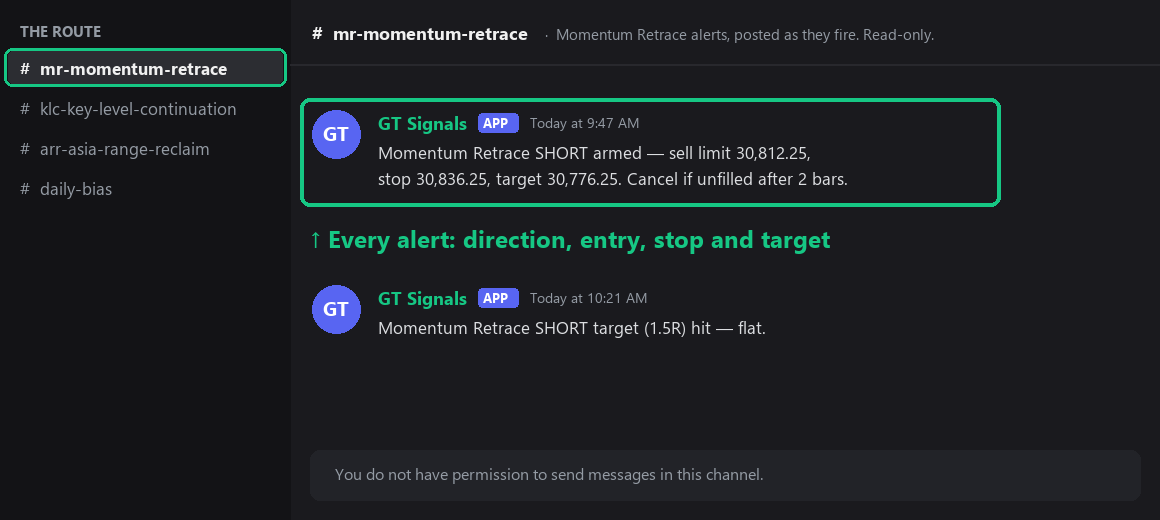
Example Momentum Retrace alert in the Discord signal feed
05

Watch for signals

Signals post in the Discord feed and draw on your chart. You decide, and you place your own trades.

How a strategy earns its place

01

Start from a written idea

Every build starts as a spec. First stop is the graveyard, to make sure we have not already killed it.

02

Build it loose

Version one takes too many trades on purpose. We want to see everything before we cut anything.

03

Write the pass line first

Pass and fail rules are written down before every test. One change per test, no exceptions.

04

Try to break it

Remove the best 20 trades. Split the years in half. Then run Monte Carlo: thousands of reshuffled trade orders, to see how deep the drawdowns can really get. It has to hold up every way.

05

Judge every rule on what it removed

Any filter is scored on the exact trades it took out. If those trades made money, the filter goes.

06

Freeze it and track it in public

Settings lock on a date. Everything after that date is out-of-sample, and it stays on the site.

LAB

Strategy Lab

The few ideas that survived the early rounds. They are close to meeting our full requirements and graduate only when they pass everything.

R.I.P.

The Graveyard

The vast majority of what we test ends up here. We keep the list so we never retest a dead idea, and so you can see how much gets thrown away.

00 / BASE CAMP

New to trading? Start here.

Six short steps. No finance degree needed. Read them in order, then open the Strategies tab.

01

What are NQ and MNQ?

NQ is the Nasdaq-100 futures contract. It moves $20 per point. MNQ is the micro version, one tenth the size, $2 per point. Beginners start on MNQ. Same chart, same signals, smaller dollars.

02

How the three strategies work

All three strategies trade NQ on a 5-minute chart. Momentum Retrace and Key Level Continuation trade the New York session; Asia Range Reclaim trades overnight. Momentum Retrace waits for a strong move, then enters on the pullback. Key Level Continuation waits for price to break a marked level, come back to test it, and continue. Asia Range Reclaim waits for price to sweep outside the evening range and come back inside, then bets it crosses to the other side. Every rule is fixed. Nothing is discretionary.

03

Reading an alert

An alert tells you four things: direction (long or short), entry price, stop price, and target. The TradingView indicator draws the same levels on your chart. You decide whether to take it. You place the trade yourself.

04

Position sizing and risk

Your stop distance times your contract count is what you lose if the trade fails. Pick that dollar number first, then work back to the contract count. The sizing calculator on the Prop Firms tab does this against the strategies' worst backtest drawdowns.

05

Placing your first trade

Start in a simulator or on one MNQ micro. Enter the entry, stop and target from the alert as a bracket order, so the exit is in place before you are filled. Do not move the stop. Log the trade.

06

Reading the results

Every number on this site is hypothetical. "Backtest" means the rules were run over past data. "Out-of-sample" means results after the settings were frozen, on data the rules never saw. Neither is money a member earned. The Track Record tab shows both, side by side.

Glossary

NQ
The Nasdaq-100 futures contract. $20 per point.
MNQ
The micro version of NQ, one tenth the size, $2 per point.
Micro
A small futures contract sized for smaller accounts.
Point / tick
A point is one full price unit. An NQ tick is 0.25 point, $5 (MNQ $0.50).
5m
A chart where each candle covers five minutes.
Long / short
Long bets price rises, short bets it falls.
Stop
The price where a losing trade is closed automatically.
Target
The price where a winning trade is closed automatically.
Bracket order
An entry with the stop and target attached, so both are live the moment you are filled.
Backtest
Running a strategy's rules over past price data to see what would have happened.
In-sample
The data used to build and tune a strategy before it was frozen.
Out-of-sample (OOS)
Results after the settings were frozen, on data the rules never saw.
Frozen
Settings locked on a date and never re-tuned after that.
Champion
The current frozen version of a strategy that is live.
Net
Total profit or loss across all trades in a window.
Profit factor (PF)
Gross profit divided by gross loss. Above 1.0 means profitable.
Win rate
The share of trades that closed positive.
Drawdown / Max DD
The largest peak-to-trough drop in account equity.
Monte Carlo
Reshuffling trade order thousands of times to see how bad the drawdown could realistically get.
Counterfactual
Comparing two trade lists that differ by one rule, to see what that rule actually changed.
Displacement
A fast, forceful price move away from a level, used as a signal of intent.
Structure break
Price closing beyond a prior swing high or low, marking a shift in trend.
VWAP
Volume-weighted average price, the average price paid so far today, weighted by volume.
EMA
Exponential moving average, a trend line that weights recent price more heavily.
Confluence
Multiple separate signals lining up at the same price, adding confidence to a setup.
Prop firm
A company that funds traders who pass its evaluation, in exchange for a share of profits.
Eval
The paid evaluation a prop firm requires before it funds an account.
Funded account
A prop firm account you trade after passing the evaluation.
Trailing drawdown
A loss limit that rises as the account makes new profit highs, and never moves back down.
EOD trailing
A trailing drawdown limit that only moves up at end of day, based on the closing balance.

Educational, not advice. You place your own trades.

01 / THE SUMMIT

Strategy pages

Plain-English mechanics, the full stat panel, and month by month results.

02 / THE RECORD

Track Record

Backtests that keep aging. Every strategy is frozen on a date, everything after that date is out-of-sample, and we highlight it.

Updated after every close. Frozen settings, never re-tuned. Hypothetical backtest results, not live fills.
04 / THE GRAVEYARD

The Graveyard

Ideas that didn't survive testing. We keep the receipts so we don't retest them, and so you can see how much gets thrown away.

Not an exhaustive list. Each entry is a tested, documented dead end, not a passing thought.

03 / BASE CAMP

Strategy Lab

Most ideas don't make it. The vast majority of what we test dies in the graveyard, killed by an out-of-sample window, a counterfactual check, or just not enough trades to matter. The few below survived years of data and the stress tests we throw at everything. They're close. They graduate to a live indicator only when they pass everything, not before.

Displacement Break

Displacement-based structure break, recon build.

Frozen, being monitored

VWAP EMA

VWAP/EMA confluence continuation.

Frozen, in a drawdown, and we're showing it

PO3 Sweep-Reclaim

Power-of-three liquidity sweep and reclaim fade.

Several configs in testing, awaiting more data
05 / THE ROUTE

Prop Firms

A reference table of funded-account rules, plus a sizing calculator.

Sizing calculator

Worst-case sizing takes the deepest drawdown in the window you picked, makes it this much worse, and sizes so your account still survives it.
Worst case
Max MNQ micros
–

Higher risk, higher reward
Max MNQ micros
–

Members also see a higher-risk size, plus how many times it would have failed the account in the backtest.

See membership · Already a member? Log in

Illustrative. Backtest drawdowns get exceeded. Educational, not advice. You place your own trades.

Compare firms

Firm Account Size Drawdown Type Drawdown $ Profit Target Automation
Rules change, verify with the firm.
MEMBER HOME

Welcome back

Your size, where each strategy stands, and your setup. The numbers are the same ones everyone sees.

Your setup

  1. Join the Discord. The invite is on your Whop membership page.
  2. Post your TradingView username in #tv-username, spelled exactly as on your profile.
  3. Find the indicators in TradingView under Indicators, Invite-only. We add you by hand, usually within 24 hours.
  4. Watch the signal feed in Discord. You place your own trades.

Hypothetical backtest results, not live fills. Educational, not advice.

ACCOUNT

Your membership

Name
Email
StatusActive member

Billing, plan changes and cancelling all happen on Whop. Members keep the rate they joined at.

06 / JOIN THE CLIMB

Membership

Everything you need to follow all three strategies yourself, you place your own trades.

Every plan is the same membership. Three strategies, clear numbers, nothing else to learn.

The price goes up each time a Strategy Lab build graduates. Members keep the rate they joined at. We add slowly. Each one has to survive first.

Start 5-day trial
Monthly

Standard

$49/mo

The regular monthly rate. Cancel any time.

Yearly

Annual

$350/yr

About $29 a month, paid once a year.

25 seats, then gone

Founder Lifetime

$499 once

Pay once. Own it forever. Full, 100% lifetime access to everything: every indicator, every alert, every tool, and every strategy we ever add. No renewals. No price increases. Ever.

What you get

  • Invite-only TradingView indicators for Momentum Retrace, Key Level Continuation and Asia Range Reclaim
  • Discord signal feed with real-time alerts
  • Contract sizing calculator
  • A private Discord of traders who take this as seriously as you do

How it works

You get the indicators and alerts. You watch the chart and place the trade yourself, in your own account, on your own terms.

We do not manage accounts or automate execution.

You are joining early

This is a trading system that is still being built, and it moves fast. New tools ship as they are ready. New strategies join the moment they pass testing. The community grows with it, and every bit of that is included in your membership.

Getting set up

You need a TradingView account. The indicators live there, and we invite you by username. A free account works. The free plan limits how many indicators fit on one chart, so check your plan if you want all three at once.

  1. Sign up. Pick a plan and start your 5-day trial.
  2. Join the Discord. Your invite link arrives right after checkout.
  3. Drop your TradingView username. Post it in the #tv-username channel, spelled exactly as it shows on your TradingView profile.
  4. Get invited. We add your username to all three indicators by hand, usually within 24 hours. They show up in TradingView under Indicators, Invite-only.
  5. Add them to your chart. Alerts start in the Discord signal feed the same day you join.
FAQ

Questions

Short answers. If yours is not here, send it below.

Do you place trades for me?

No. You get the indicators and alerts. You watch the chart and place every trade yourself, in your own account. We do not manage accounts or automate anything.

What do I need to get started?

A TradingView account (free works) and Discord. After checkout, join the Discord, post your TradingView username in #tv-username, and we add you to all three indicators, usually within 24 hours.

Does a free TradingView plan work?

Yes. The free plan limits how many indicators fit on one chart, so if you want all three on one chart at once, check your plan.

What market and timeframe?

Nasdaq futures (NQ and MNQ) on the 5-minute chart. The backtests run on NQ. Most members trade the micro (MNQ).

Are the results real trades?

No. Every number on this site is a backtest over years of data, with commissions and one tick of slippage per trade. Real fills can be worse. The Track Record tab shows how each strategy has done since it went live.

Can I use this on a prop firm account?

Many traders do. Firm rules differ and change, so check your firm's rules yourself. Most firms ban holding opposite positions across your accounts, even at different firms, so never be long in one account and short in another at the same time.

How does the free trial work?

Monthly and annual plans start with 5 days free. Cancel any time during the trial and you are never charged. Lifetime is a one-time purchase and has no trial.

Can I get a refund?

On monthly and annual plans, the 5-day trial is the refund window. After your first payment, payments are not refundable. Lifetime is a one-time purchase with no trial, and it is final, so try a monthly plan first if you are unsure. When you cancel, you keep access until the end of the period you paid for. Charged in error? Email us within 14 days and we will fix it.

Will my price go up?

No. The price goes up for new members each time a new strategy graduates. You keep the rate you joined at for as long as you stay a member.

How do I cancel?

From your Whop account, any time. Access stays on until the end of the period you paid for.

Why show a Graveyard?

So you can see what we tested and threw out. Most ideas fail. Showing the dead ones is how you know the live ones had to earn their spot.

Send feedback

A bug, a question, an idea, or something that looks wrong. It comes straight to us.